AI receptionist + WhatsApp AI chatbot · Kerala

Every customer, attended.

ഓരോ കോളിനും ഓരോ വാട്സ്ആപ്പ് സന്ദേശത്തിനും മറുപടി.

Aluria answers your phone in Malayalam and chats with customers on WhatsApp in Malayalam and English. It books, reminds and hands over to your team, around the clock.

  1. 08:02Call answered
  2. 08:03Booked for 5:30 pm
  3. 08:03Confirmation sent on WhatsApp
  4. Tomorrow 09:00Reminder call placed

For any business that runs on appointments

01 The cost of a missed call

What missed calls cost

If you miss calls a day, and of them would have booked at each, that is about ₹19,500 a month.

An estimate from your own numbers.

02 Around the clock

One day with Aluria.

The call before you open. The message on a Sunday. The reminder the day before. Nothing waits for someone to be free.

  1. 07:58Phone

    The call before you open

    Aluria answers in Malayalam and books the first slot of the day.

  2. 10:20WhatsApp

    A customer asks your prices

    A reply in seconds, in Malayalam or English, while your team is busy with someone in front of them.

  3. 13:05Phone

    Lunch, and the phone still rings

    The call is answered, and if the caller needs a person, a callback is noted for your team.

  4. 17:30Phone

    Tomorrow's customers get a reminder

    Aluria calls them, so fewer slots go empty.

  5. 21:40WhatsApp

    After hours, someone needs to reschedule

    Done in the chat. Your calendar updates, and nobody had to stay late.

  6. Next morningDashboard

    You open one screen

    Every booking, call and chat from the day before, and who needs a reply.

03 Two channels, one Aluria

The phone, and WhatsApp.

Phone

AI receptionist

Malayalam

  • Answers every call, the way your best receptionist would
  • Books, reschedules and cancels appointments
  • Answers questions about timings, services and prices
  • Transfers to your team, or takes a callback
  • Calls customers to remind them before they come

WhatsApp

AI chatbot

Malayalam and English

  • Replies in seconds, at any hour
  • Answers questions and shares your details
  • Books and reschedules right in the chat
  • Sends confirmations and reminders
  • Hands the chat to your team when a person is needed

Both feed the same customer record and the same dashboard, so nothing is said twice and nothing is lost.

04 Your dashboard

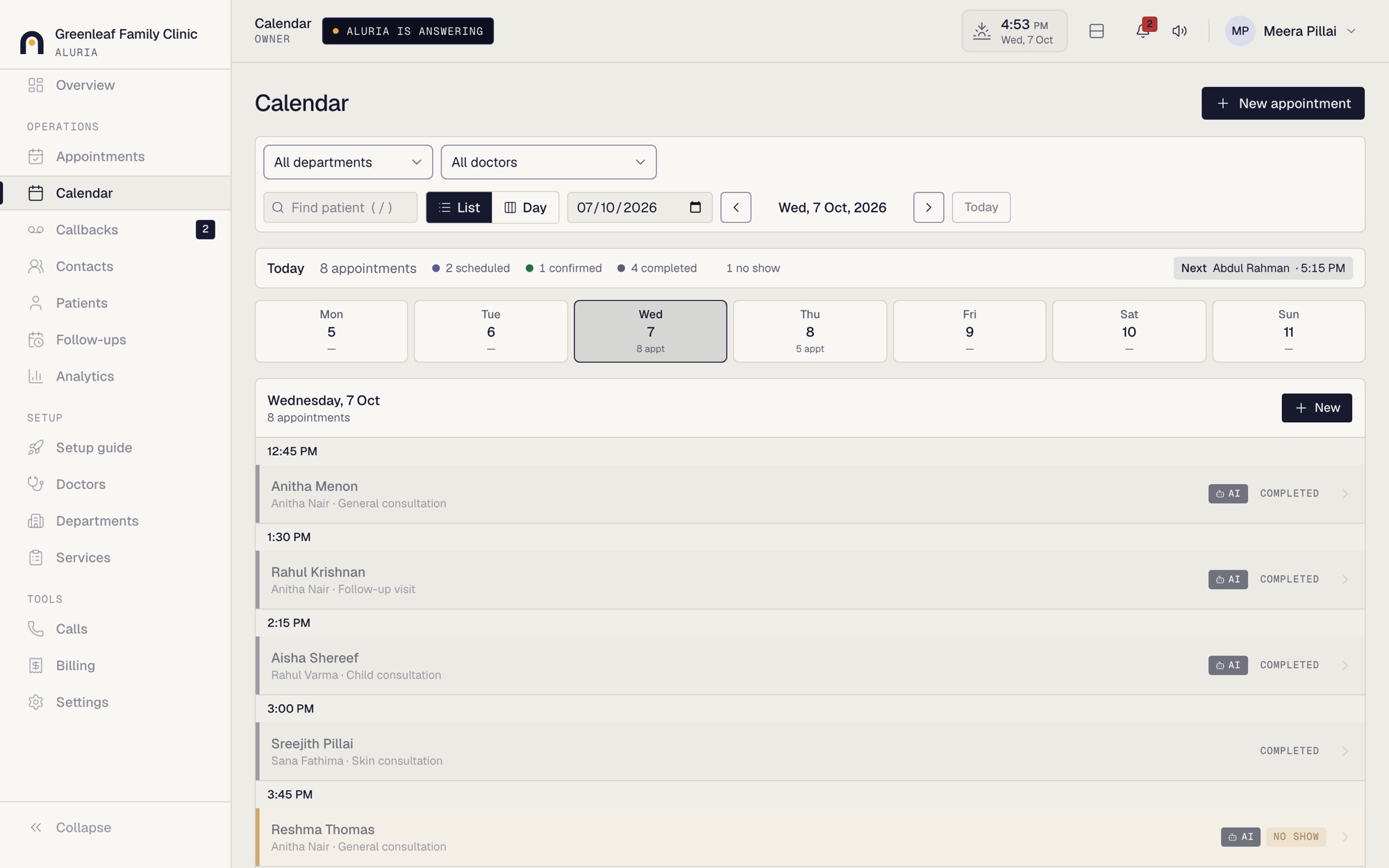
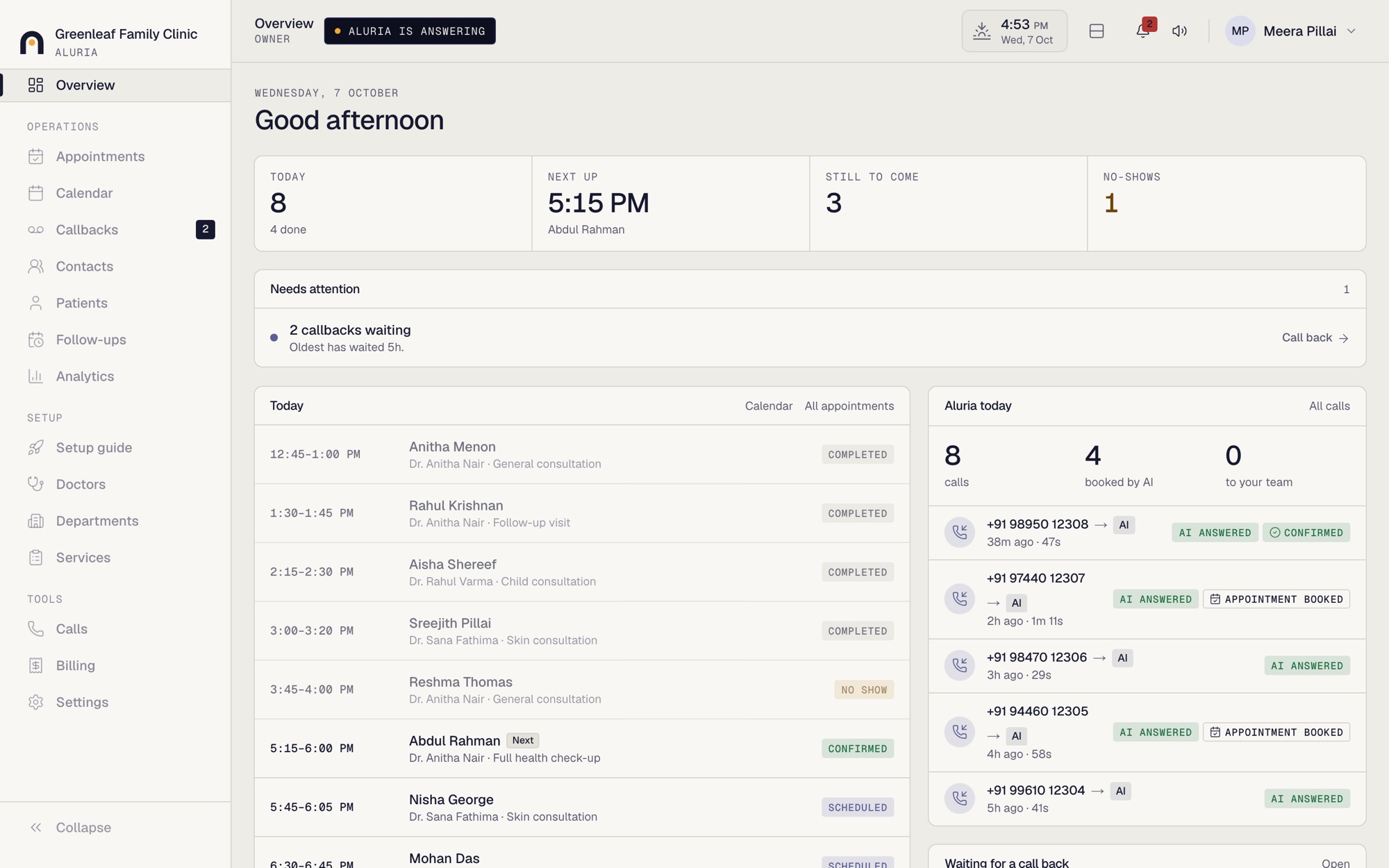
Your whole day, on one screen.

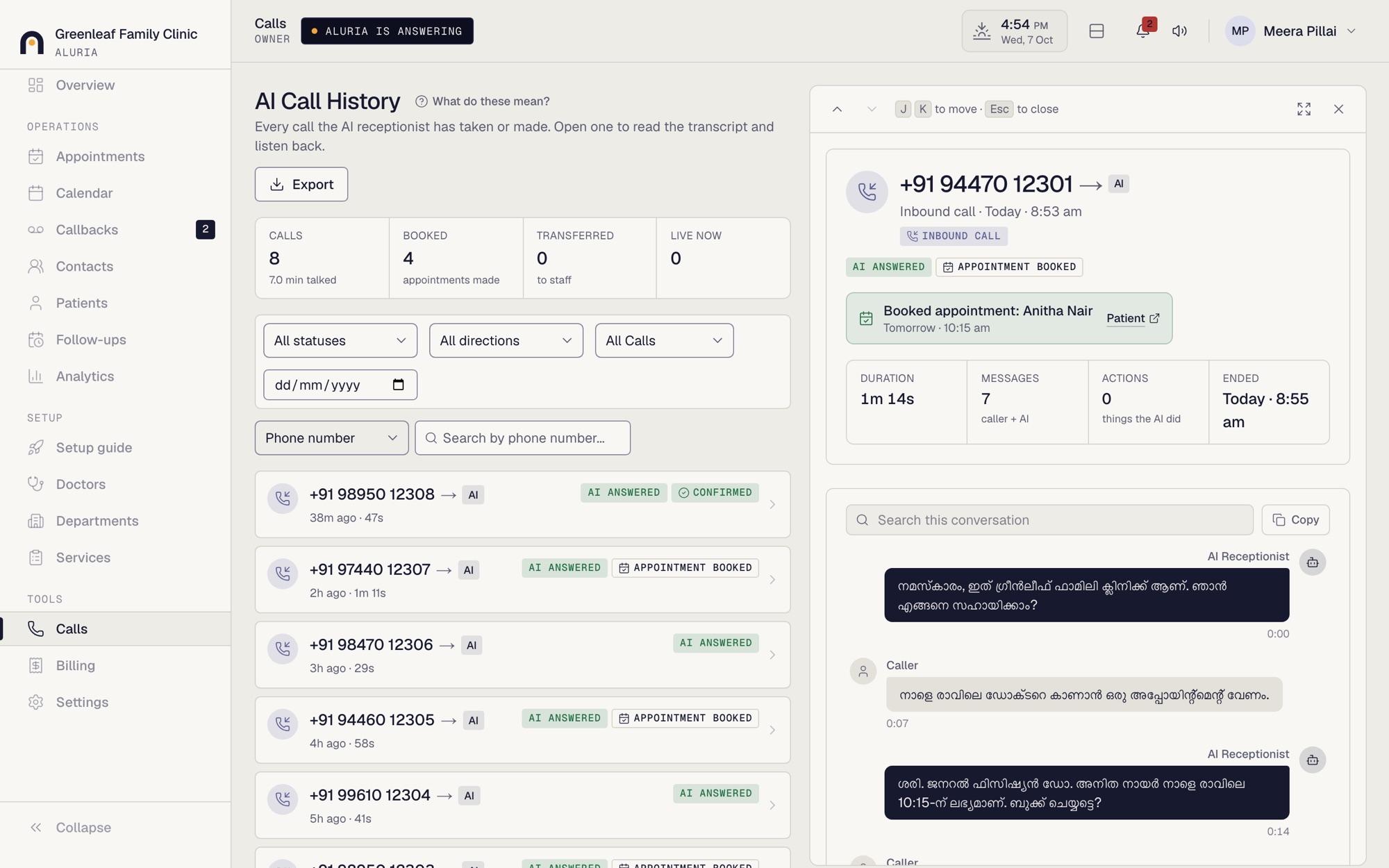
Who is coming, what was said on every call and chat, and who needs a reply. A sample, with made-up names.

The Aluria dashboard overview for a sample clinic: today's appointments, calls Aluria answered and callbacks waiting
A sample clinic with made-up names. This is the real dashboard.

05 Pricing

Pick a plan that fits your volume.

Prices are per month in Indian rupees. Calls are never cut off: if you go past your included minutes, the extra minutes are charged at a small per-minute rate.

Loading plans…

06 Getting started

We do the setup with you.

  1. 01

    A short demo

    See Aluria answer a call and a chat, and ask us anything.

  2. 02

    We set it up with you

    Your phone line and WhatsApp, your services and team, your opening hours and greeting.

  3. 03

    Aluria starts answering

    Your dashboard fills with bookings, calls and chats, and we stay available if you need changes.

07 Questions

Before you book a demo.

Which languages does it speak?

On the phone, Aluria speaks Malayalam. On WhatsApp it chats in Malayalam and English, and replies in the language the customer writes in.

What can the WhatsApp chatbot do?

It answers questions about your business, books, reschedules and cancels appointments, and sends confirmations and reminders. When a person is needed, it hands the chat over to your team.

What if Aluria can't help a caller?

It transfers the call to a number you choose, or records a callback request so your team can ring the customer back. Nothing is left hanging.

Do we need any technical setup?

No. We set up your phone line and WhatsApp with you when you join, and the Aluria team handles the connection and the first setup of your business.

What happens if we use more minutes than the plan includes?

Calls keep working. Extra minutes are added to the month's bill at the per-minute rate shown under Pricing, and you can see your usage in the dashboard at any time.

How do we pay?

Plans are billed monthly. You pay by UPI, we mark it received, and your payment history is visible in your dashboard.

Who can see our calls and customer information?

Only the people in your business that you give a login to. Your dashboard shows recordings, transcripts and appointments for your business alone.
08 Book a demo

See Aluria answer a call for your business.

Tell us a little about your business and we'll contact you to arrange a short demo. No commitment.